Donor Quick Start; (scroll down for complete menu)
Navigating the App
Navigating the App
Navigating the App

LOG IN: using a link from an email. Request another email with a link. Or click "Forgot Password"
Update Your Status
Navigating the App
Navigating the App

EVENTS: You can see your status for this event, and change it if you wish
Needs List
Navigating the App
Needs List

NEEDS LIST: Look at the bottom of the 'EVENTS' page for a list of items your local pantry needs
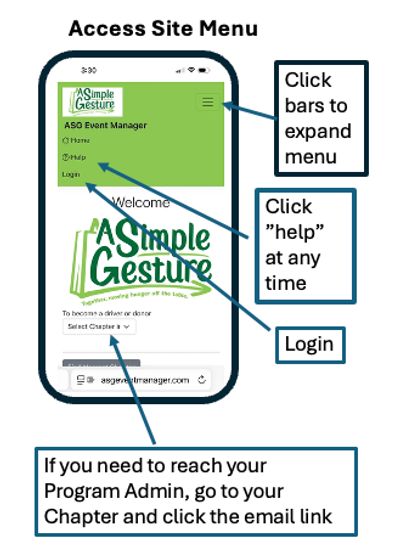
Log In/Access Menu
Our Operating System provides your personal site page to manage your donation status and provide more details, such as the ‘Needs List’.
The best way to access the site is using an email that we have sent you, containing a link. That link takes you to your site page, no password is needed.
The alternative is to request a new email or use your password. Do this by going to www.AsgEventManager.com to access the site, and clicking ”log in”
The Menu is accessed by clicking the 3 horizontal bars if your using a Smart Phone, otherwise it just appears at the top of the browser.
HOME: This page will display general information about your Program
HELP: This opens up the Donor Help Menu (this page).
LOGIN: Click "Login" Log In to the ASGEventManager.com software. We provide two primary methods, one without a password and one that uses a password.
NO PASSWORD: This is the preferred method. Your username is your email address. If you lose it, click 'Login' then "resend login link email'.
PASSWORD: You can still use a username/password combination. You can also reset your password by clicking 'Long' then "reset password'. You can edit your password in your profile settings.
If emails are going into SPAM, click here to resolve the issue.
Edit Your Profile
When you register you'll be taken directly into your profile screen. Later on, you can access this from the main menu right after logging in.
We don't require your email or last name.
Email address is required; this is how we send reminders and system notifications. We also require a cell number for texting. However, you can just put in a single digit like a "7" for your cell as an override if you never want to get a text. (you can also opt out of email or text at anytime by clicking 'unsubscribe' at the bottom of any system notification.
PRIVACY POLICY: Click the link to view the policy. We will never share your information or send you spam. We will send pertinent emails or texts related to your food donation or driving involvement.

Bottom of Profile Page; Set Donor/Driver Options

Your Profile Page controls your settings for ALL FUTURE EVENTS. This is different than your EVENTS page, which just cover your status for the next event.
UPDATE STATUS FOR NEXT DONOR EVENTS
When you receive an email from us regarding an upcoming event, you'll have a link that takes you directly to your "Site Events Page". You can then tell us if your status has changed.
You can also access this page from the main menu by clicking "Events" after logging in.
Click "YES" I will be a Food Donor if it isn't already selected, and we will be at hour doorstep to pick up your donation. If you can't participate, you can click "I can't be a Food Donor" up to the time your pickup is scheduled.
If you can't leave out a bag of food, you still have up to 3 other ways to participate. You will receive an email explaining your options, we hope you can still help! But if not, we will see you next time.
NOTE: Your page might have DRIVER information if you are set up to also be a driver, it works the same way. (see image)

Updating Event Status

The system sends a notification email, click the link to change your status. No email? check spam first, if still no email go to LogIn and ask for a new link email to be sent.

After clicking the link in the email, you'll be taken to your Site Page where you can update your status

Drivers have their own section on the Site Page for Driving Status
Filling Your Bag; Needs List
We appreciate anything you choose to donate, but there are preferred items.
- For safety, we ask that you not include any breakable items.
- When you follow the link from any of the notifications there will be a "needs list" specific to your upcoming event.
- Shelf stable items are preferred.
- Items high in nutritional value, especially protein are the most desirable (peanut butter, canned meats, hearty soups).
- Canned vegetables, pasta, rice, crackers, cereals (low sugar please), and breads are all desirable items.
Fixing Spam Email Issues
Unfortunately, it's a big problem for us. Our emails might be going into your SPAM FOLDER. This is because we send out a lot of email nation-wide, and nearly all of them contain links.
There are many ways to fix this problem, but they depend on the email server you are using. Some common fixes;
1. Add us to your contacts list on that email server. For example, if you use hotmail or live.com, you should add us to your hotmail contact list. Add noreply@asgeventmanager.com.
2. You might be able to right-click the email in your spam folder and select "not Spam" or "do not block". or "Add Sender to Contacts"
3. If these don't help, please do a quick internet search for your email server. For example "Emails going into spam on my sbcglobal account". There will be specific information to prevent that from happening to our emails. Very sorry about the trouble, but once fixed you will get our event updates.
